

Tree View
Canopy displays Jira issues in a tree structure that reflects their parent-child relationships.
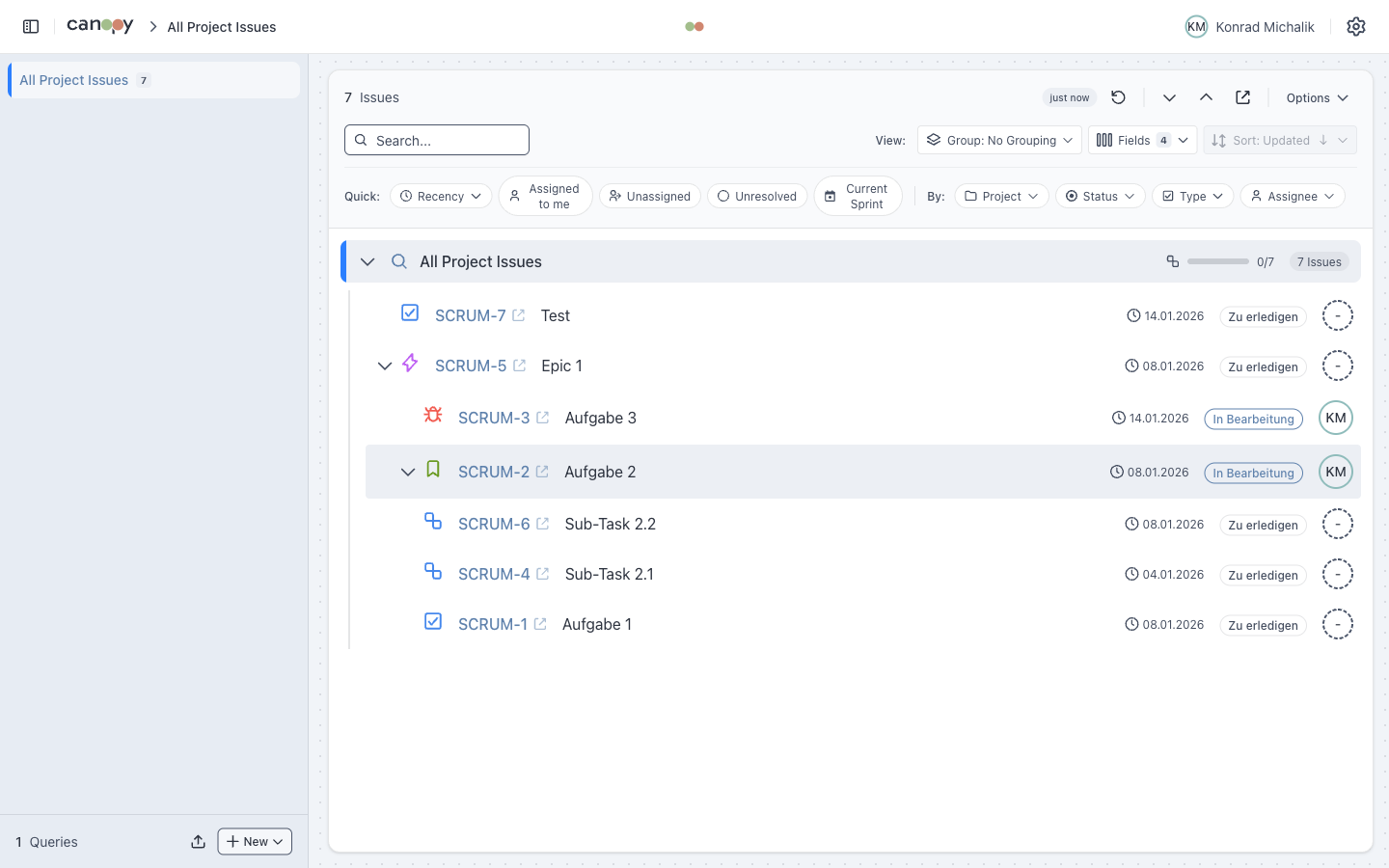
Hierarchy Levels
| Level | Issue Type | Parent Detection |
|---|---|---|
| 1 | Epic | Root level |
| 2 | Story | parent field or Epic Link |
| 3 | Task | parent field or issue links |
| 4 | Subtask | parent field |
Hierarchy Detection
Parent-child relationships are detected using (in order of priority):
parentfield - Used in Jira Cloud and for all subtasks- Epic Link - Custom field for Server/Data Center (auto-discovered)
- Issue Links - Links with parent-child relationship types
Epic Link Discovery
For Jira Server instances, Canopy automatically discovers the Epic Link custom field by querying the /field endpoint.
Tree Controls
| Action | Description |
|---|---|
| Click chevron | Expand/collapse single node |
| Expand All | Expand all nodes in the tree |
| Collapse All | Collapse all nodes |
Progress Indicators
Issue cards can display several progress metrics:
Individual Progress
Shows time logged vs. estimated for the issue itself.
[====----] 50% (4h / 8h logged)Aggregated Time
Sum of time progress for all child issues.
[======--] 75% (Children: 12h / 16h)Aggregated Resolution
Percentage of resolved child issues.
[========] 100% (3/3 children resolved)Issue Card Fields
Each issue card can display:
| Field | Description |
|---|---|
| Key | Clickable link to open in Jira |
| Summary | Issue title |
| Status | Current status with color badge |
| Assignee | User avatar and name |
| Priority | Priority icon |
| Progress | Time tracking bars |
| Dates | Created, Updated, Due Date |
| Labels | Issue labels as badges |
Configure visible fields in Settings > Fields.
Keyboard Navigation
Navigate the tree efficiently with keyboard shortcuts:
| Key | Vim | Action |
|---|---|---|
↓ | j | Move to next issue |
↑ | k | Move to previous issue |
→ | l | Expand node or move to first child |
← | h | Collapse node or move to parent |
Home | - | Move to first issue |
End | - | Move to last issue |
Enter | - | Open issue in Jira |
Space | - | Toggle expand/collapse |
Escape | - | Clear focus |
See Keyboard Shortcuts for the complete reference.
Resizable Sidebar
Drag the sidebar edge to resize. Width is persisted across sessions.