

Features
roots combines work time data from multiple services into a single interface. Here's what you can do with it.
Core Features
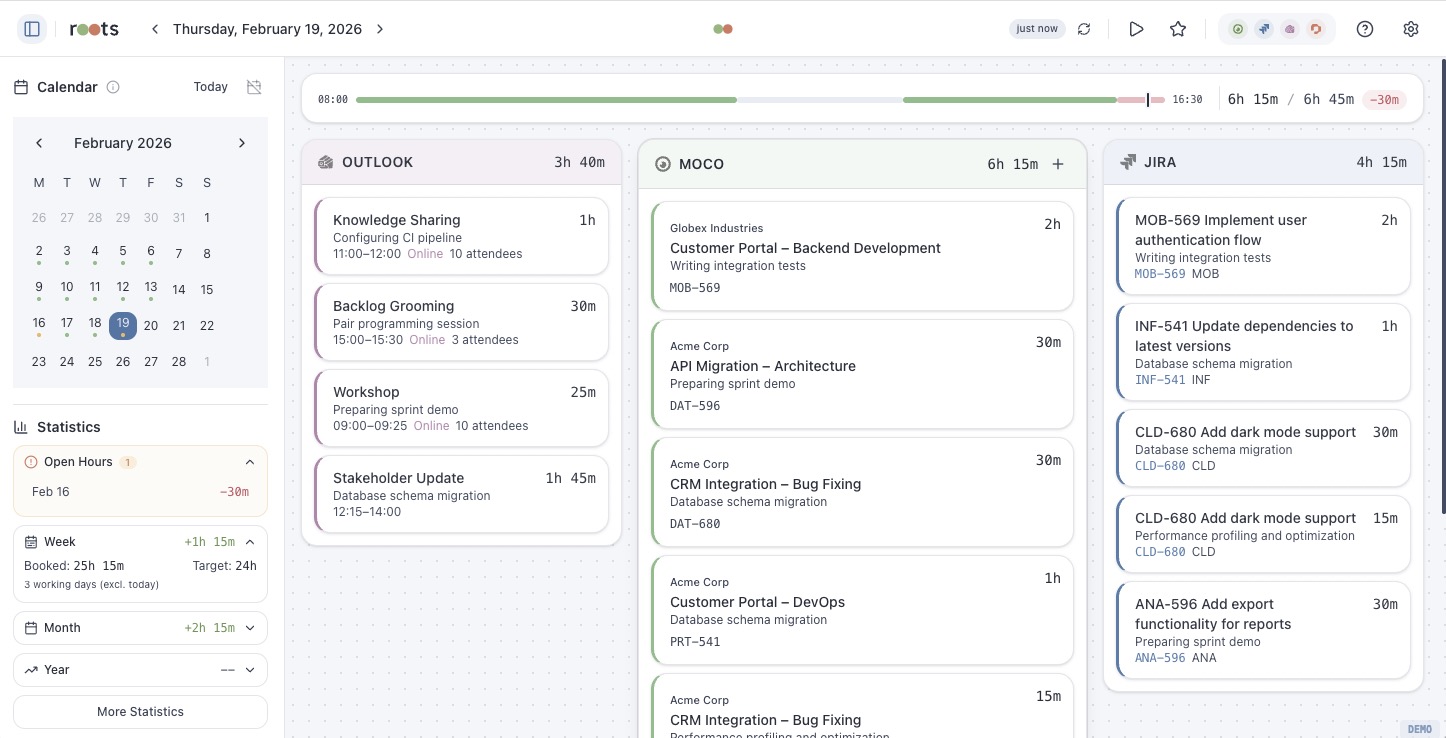
Unified Timeline
The main view shows time entries from all connected services in parallel columns. Each service gets its own column — Moco, Jira and Outlook entries are displayed side by side for easy comparison.
Cross-Source Matching
roots automatically detects entries that likely refer to the same work across different services. When you hover over an entry, matched entries in other columns are highlighted. Matching uses confidence scores based on time overlap and description similarity.
Target/Actual Comparison
The header shows a progress bar for each day, comparing booked hours against your daily target (derived from Personio work schedule or manual settings).
Favorites
Pin frequently used project/task combinations as favorites for one-click booking. Favorites support drag-and-drop reordering. The favorites section in the sidebar can be collapsed and toggled off entirely in Settings > Features.
Smart Booking Suggestions
When booking a Jira worklog or Outlook event to Moco, roots suggests a project and task based on your recent booking history. It scans the past 7 days for Moco entries that match the Jira project key or Outlook event title and suggests the most recent match. Suggestions appear as a collapsible chip in the booking modal and can be toggled off in Settings > Features.
Timer
Start a timer to track work in real-time. When you stop the timer, roots creates a Moco time entry or saves it as a draft for later booking.
Drafts
Save timer results as drafts when you're not ready to book yet. Drafts persist across sessions and can be booked to Moco or deleted later.
Presence Tracking
When Moco is connected, roots shows a presence progress bar for each day. It visualizes clock-in/clock-out times, breaks and booked vs. unbooked time. You can create, edit and delete presence entries directly.
Statistics
Monthly and weekly statistics with project breakdown, billable/non-billable split and interactive donut chart. Navigate between months to compare performance over time.
Auto-Refresh
Configure automatic data refresh at 5-minute, 30-minute or 1-hour intervals to keep your timeline up to date without manual reloading.
Data Sources
| Service | Entries | Edit | Create | Delete |
|---|---|---|---|---|
| Moco | Time entries | Yes | Yes | Yes |
| Moco | Presences | Yes | Yes | Yes |
| Jira | Worklogs | Yes | Yes | Yes |
| Outlook | Calendar events | No | No | No |
| Personio | Absences | No | No | No |
Outlook events and Personio absences are read-only — they provide context but cannot be modified from roots.